![secure-sketch-logo-white.png]](https://www.secure-sketch.com/hs-fs/hubfs/DEV/knowledge/images/secure-sketch-logo-white.png?height=50&name=secure-sketch-logo-white.png)
English version of this content is provided by automatic translation without the assistance of a human translator. See the Japanese version of this content for accurate and up-to-date information.
Target plan 
Learn more about each permission and how to change it for group members who have access to group features such as the integrated dashboard.
Note
Only members with administrator privileges can change the privileges of group members.
Details of each authority | Procedure for changing authority
Details of each authority
There are three types of authority for group members: "administrator", "editor", and "viewer".
The range that can be operated differs for each authority.
| Administrator | Editor | Viewer | |
| Browsing the group management screen | 〇 | 〇 | 〇 |
| Edit group name | 〇 | 〇 | |
| Add / remove group members | 〇 | ||
| Add / remove diagnostics belonging to a group | 〇 | ||
| Viewing the status of diagnostic measures belonging to a group | 〇 | 〇 | 〇 |
| Change the status of diagnostic measures belonging to the group | 〇 | 〇 | |
| Add / remove members / change permissions | 〇 | ||
| unlock* | 〇 | ||
| Add IP address for connection | 〇 |
*If you have only one member, you cannot unlock it from the screen, so please contact us from the inquiry form.
Permission change procedure
1. At the top of the screen  Click the icon

2. Click [Group Management]
The setting items are displayed. Click [Group Management] to display the group management screen.

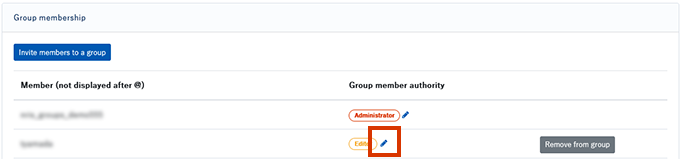
3. Of the member you want to change  Click the icon
Find the member whose authority you want to change from the members belonging to the group at the top of the group management screen, and find it in the authority column. Click the icon.
4. Click on permissions
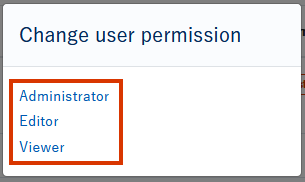
A permission change popup will be displayed. Click the permission you want to set.
5. Click OK
A confirmation pop-up will be displayed. Click [OK] to complete the change.